
UAT Done Well: Scenarios, Sequencing, and the Moves That Matter.
What to test, how to sequence it, and what to do when UAT surfaces something you did not expect.
Two weeks ago, I wrote about why UAT matters and why so many teams get it wrong. If you have not read that one yet, start there. This article picks up where it left off.
Part one was about the why. This one is about the how.
Most of the advice floating around about UAT is either generic testing guidance borrowed from the software development world, or vague reassurance that “testing is important.” Neither one helps you actually test a PSA implementation.
The specifics matter. The scenarios matter. The order of operations matters. That is what we are going to get into.
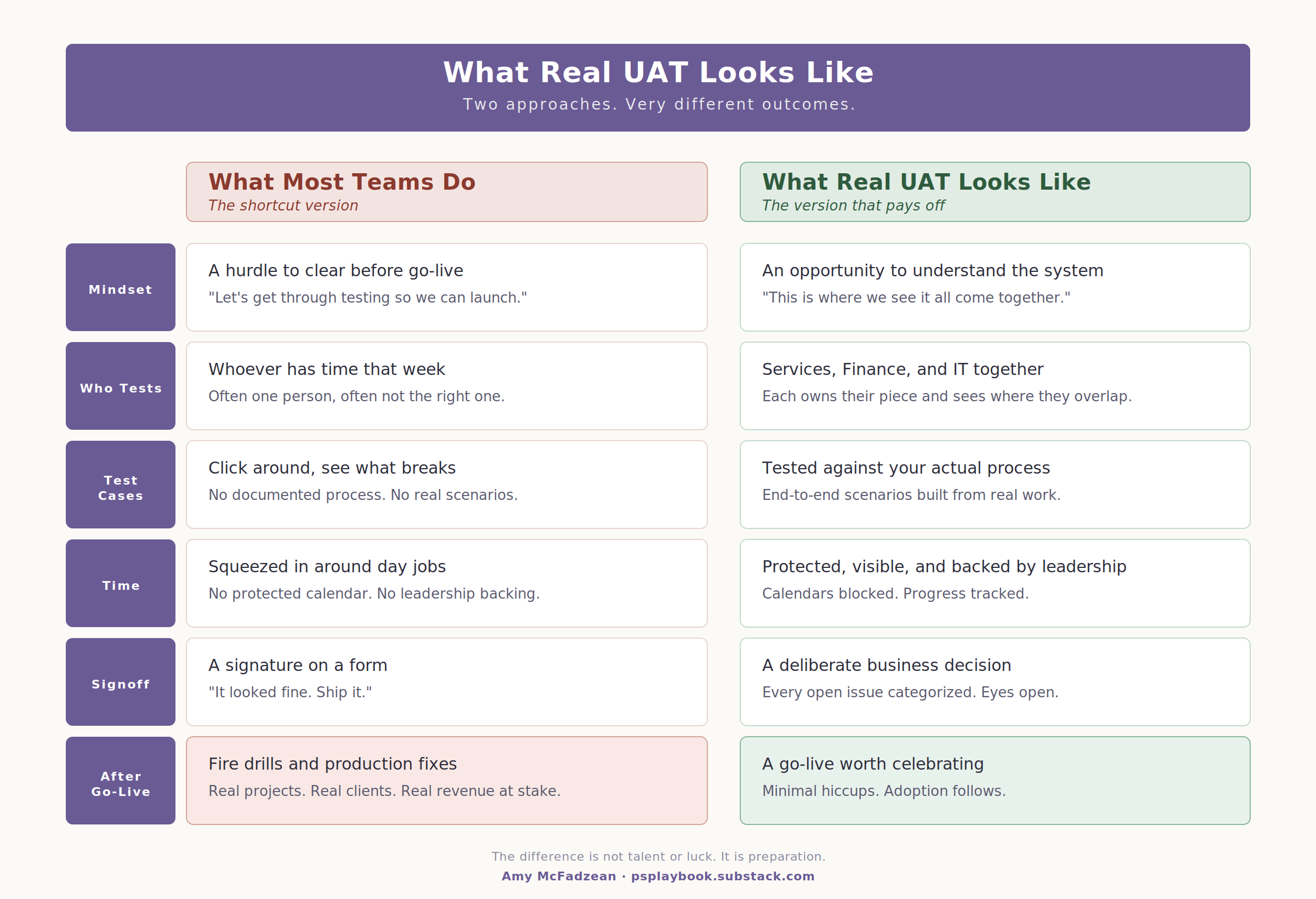
Start with Your Process, Not the System
Here is the single biggest mistake I see teams make when they sit down to build test cases: they start with the system. They open the configured tool, click around, and try to think of things to test. That approach will get you surface-level coverage at best, and it will miss the things that matter most.
The right starting point is your process. Document it before UAT begins. Not perfectly. Not comprehensively. Enough that you have a clear picture of what your business actually does and how the system is supposed to support it.
Your process documentation does not need to be a polished artifact. It can be a whiteboard sketch, a swim lane diagram, a bulleted list, or a Google Doc written in plain language. What matters is that you have written down, in some form, the answers to these questions:
What does the work look like from start to finish? Who does what? Where does the system fit in? What happens first, what happens next, and where are the handoffs between teams?
Once you have that, you have something to test against. That changes everything. Without it, your team is just clicking around and hoping nothing feels wrong. With it, your team is validating whether the system supports the actual work.
This is what “test to your process” really means. It is the difference between UAT that works and UAT that wastes everyone’s time.
What a Good Test Scenario Looks Like
A good test scenario has three layers, and most teams only test the first two.
Layer 1: The high-level process step. What is the user trying to accomplish? Creating a project. Submitting a timesheet. Generating an invoice. Closing a project at month end. These are the big moves in your process, the ones a user would describe if you asked them what they do all day.
Layer 2: The detailed steps inside each move. What fields get populated? What buttons get clicked? What approvals get triggered? What exports fire? This is where most teams stop, and it is also where most teams miss things.
Layer 3: Negative test cases. This is the layer almost nobody tests. What happens if I do something I am not supposed to do? What happens if I enter a value that is out of range? What happens if I skip a required step? What happens if I try to approve something I should not have access to approve?
Negative test cases are where the real gaps show up. They uncover missing validation, broken permissions, workflows that route to the wrong place, and edge cases that would otherwise hit you after go-live. Yes, they take more time. Yes, they feel tedious. Do them anyway, at least for your critical paths.
A complete test scenario covers all three layers. The big move, the detailed steps, and at least a handful of “what if I do this wrong” cases.
If your test scenarios only cover the first two layers, you have a gap.
Who Writes Them, Who Executes Them
This is a question almost every team gets wrong, and it usually goes one of two ways.
The first version: the consultant writes all the test scripts and hands them to the client to execute. On the surface this feels efficient. In practice, it is a disaster waiting to happen. The consultant does not know your business well enough to write test cases that actually reflect your work. The scripts end up generic, the testing ends up shallow, and the gaps do not show up until after go-live.
The second version: the client tries to write all the test scripts themselves, from scratch, in isolation. This usually means the busiest people in the organization are also being asked to invent test methodology on top of their day jobs. Scripts get thin. Coverage gets spotty. Testing happens, but it does not catch what it needs to catch.
The version that actually works is collaborative.
The consultant brings a starter framework, standard scenarios for the platform, and guidance on what to cover. The client brings deep knowledge of their process, their edge cases, and the things that matter most to their business. Together they build scripts that are both methodologically sound and genuinely reflective of the work.
Execution should sit with the business, full stop. The people who will use the system every day are the ones who should be running through the scenarios. Not the consultant. Not IT alone. The actual users.
And here is where the “busiest people problem” from part one comes back. Your best testers are almost always the people who understand the process most deeply, which means they are the people whose day jobs are hardest to interrupt. That is not a reason to let them off the hook. That is a reason to make the case to leadership that their time is worth protecting for this.
The Order of Operations
This is something I see tripping up teams constantly, and it is usually invisible until it causes problems.
UAT is not a single linear pass through the system. It works best when you sequence it thoughtfully, starting with the foundation and building outward. Something like this:
Start with administration and setup. Users, roles, permissions, access. If these are wrong, nothing downstream will work correctly, and you will waste hours chasing problems that trace back to a permission issue.
Move to project setup and resource management. Can you create a project the way your process says you should? Does the phase and task structure populate correctly? Can you book resources? Can the project be assigned and managed by the right people?
Then transactional processes. Time entry. Expenses. Approvals. This is where your actual day-to-day work happens, so this is where you test most intensively.
Then month-end and financial processes. Billing. Revenue recognition. Exports to your source system. These often only run once a month, which means bugs here can hide until the worst possible moment. Test them carefully, and test them at full volume with representative data.
Finally, the things that happen only occasionally. Project closure, archiving, year-end processes. These get skipped most often, and they are also the places where overlooked issues tend to surface months later.
If you sequence your testing like this, you catch foundational issues first and build confidence layer by layer. If you do not, you spend a lot of time testing invoices against a project that was set up incorrectly in the first place.
What to Do When UAT Surfaces Something Unexpected
It will. That is actually the point.
When testing surfaces an issue, the worst response is “let’s add a change request to the backlog and move on.” The better response is to pause and ask three questions.
Is this a bug, a gap, or a process question? Bugs are configuration issues the team can fix. Gaps are things that were not scoped. Process questions are moments where the system revealed that the business has not actually agreed on how something should work.
That third category is the one worth lingering on.
A surprising amount of what surfaces during UAT is not really a system problem. It is a business process problem the old system had been quietly masking.
Finance thought it worked one way. Services thought it worked another. Nobody noticed because the old tool accommodated both. Now the new system is forcing a decision, and the decision needs to get made by the business, not by the consultant. When this happens, do not defer it. Make the decision. Document it. Then test against the decision you just made.
Is it a go-live blocker or a month-three item? Not everything needs to be fixed before launch. Some things can and should be deferred to a later phase, especially if you are following the “keep it simple at go-live” principle. The goal is to make the decision deliberately, with the business, rather than defaulting one way or the other.
Who needs to know? Issues that affect one team often have downstream effects the testers cannot see. A change to how Finance categorizes a transaction might affect how Services books resources. A change to a project template might affect how the PMO runs reports. Communication during UAT matters as much as testing itself.
A Note on the Work Behind the Work
There is a layer of UAT I have not talked about yet, and it is the one that separates teams that do this well from teams that get by: preparation.
Good UAT does not start when testing starts. It starts weeks before, with a real preparation phase:
Validated requirements
A configured system that reflects those requirements
A testing environment that mirrors production
Representative data
A test plan with scope, objectives, and acceptance criteria
Trained testers who know their roles
Clear issue management
Defined signoff criteria
None of that happens by accident, and none of it happens overnight. It is the work behind the work, and it is what makes the difference between UAT that functions as real validation and UAT that functions as theater.
If you are preparing for UAT and any of those preparation elements feel thin, that is worth paying attention to now, before testing starts.
The Bottom Line
UAT works when it is:
Tied to your process
Built collaboratively
Sequenced thoughtfully
Taken seriously by the business
It fails when it is:
Outsourced
Rushed
Treated as a formality
Disconnected from the actual work
Every implementation I have ever worked on that went smoothly had real UAT behind it. Every one that struggled had UAT problems you could see coming, if anyone had been paying attention.
The work is unglamorous. Most of it is tedious. None of it is exciting to talk about at leadership meetings. Do it anyway. The version of your go-live that happens because you took UAT seriously is the version worth working toward.
If any of this resonated, I would love to hear about it in the comments. What has worked for your team? Where have you seen UAT surface something nobody expected? The more we talk about this openly, the better equipped we all are to do it well.
Amy McFadzean is a PSA consultant and SuiteProjects Pro specialist with 20 years in professional services and over a decade helping organizations implement, optimize, and get real results from their PSA platforms. PS Playbook is where she shares what she has learned along the way.
If this resonated, subscribe for more practitioner-first perspectives on PSA, professional services operations, and making your systems actually work for you.